A review of the new exposure management tool and its benefits for security professionals. In this fourth blog post, I will go over the features and benefits of Microsoft Exposure Management and how it can help you lower your exposure and enhance your security posture. If you are a security professional looking for a better way to manage your security exposure, you might be interested in Microsoft Exposure Management in Microsoft XDR.
Security exposure is the degree to which an organization is vulnerable to cyberattacks, data breaches, and other cyber threats. It is influenced by many factors, such as the number and severity of vulnerabilities, the configuration and patching status of assets, the compliance with security policies and standards, and the effectiveness of security controls and defenses. Managing security exposure is a critical task for security teams, as it helps them prioritize their efforts, allocate their resources, and reduce their risk.
However, managing security exposure is not an easy task, especially in today's complex and dynamic IT environments. Security teams often face challenges such as:
Lack of visibility into the entire attack surface, including cloud, hybrid, and remote assets.
Difficulty in assessing the impact and exploitability of vulnerabilities.
Inability to correlate and analyze data from multiple sources and tools.
Overwhelming number of alerts and noise.
Limited time and resources to remediate and mitigate exposures.
To address these challenges, security teams need a comprehensive and integrated solution that can provide them with a centralized and holistic view of their security exposure, as well as actionable insights and recommendations to improve their security posture. This is where Microsoft XDR Exposure Management comes in.
With Exposure Management, you can:
Evaluate and prioritize your security exposure based on the severity, impact, and likelihood of exploitation of each vulnerability.
Track and measure your security posture over time and compare it with industry benchmarks and peer organizations.
Gain visibility into the root causes and contributing factors of your exposure, such as misconfigurations, outdated software, or weak policies.
Get actionable recommendations and guidance to remediate and mitigate your exposure and reduce your attack surface.
Automate and orchestrate your response workflows using built-in and custom playbooks that leverage the power of Microsoft XDR and other Microsoft security solutions.
What is Exposure Management?
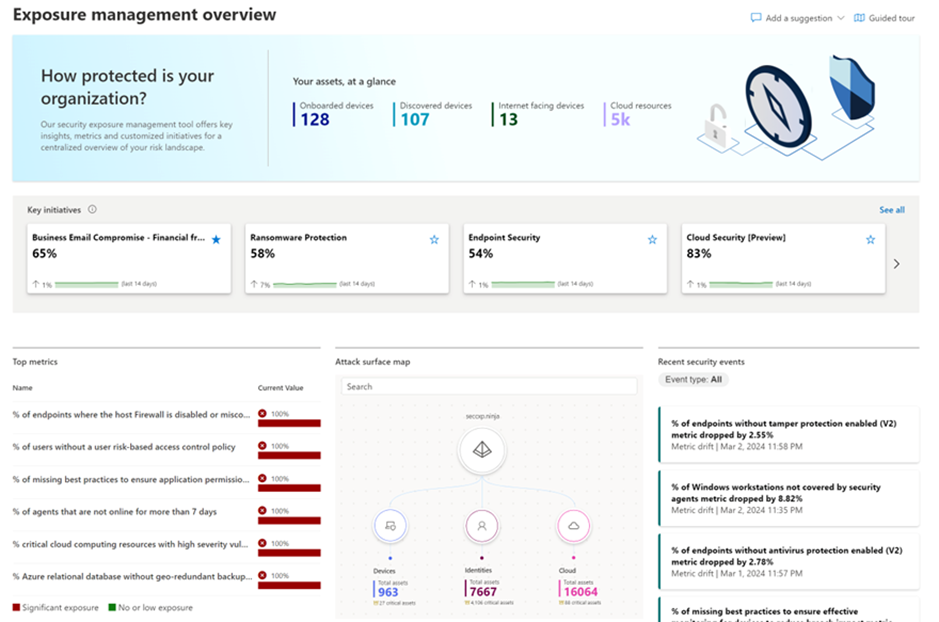
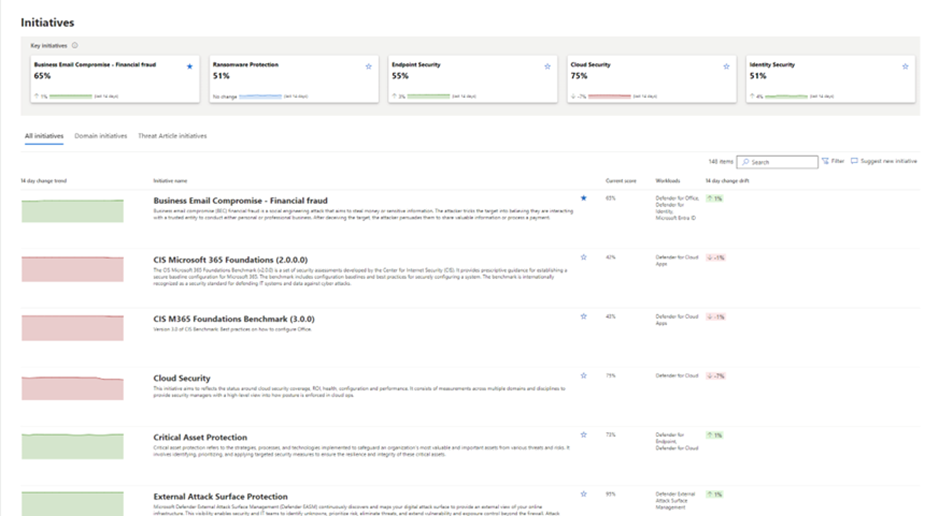
Exposure Management is a newer feature in the Microsoft XDR stack. Exposure Management is a security exposure management tool that offers key insights, metrics, and customized initiatives for a centralized overview of your organization's risk landscape. It helps security teams to:
Discover and inventory all their assets across on-premises, cloud, and hybrid environments.
Identify and prioritize the most critical and exploitable vulnerabilities and misconfigurations.
Measure and track their exposure score, which is a quantifiable metric that reflects their security posture and risk level.
Gain visibility into the threat landscape and the potential impact of exposures on their organization.
Get tailored and actionable recommendations to remediate and mitigate exposures
Integrate with other Microsoft XDR capabilities and third-party tools for seamless orchestration and automation.
Exposure Management is designed to help security teams reduce their attack surface, improve their security hygiene, and enhance their resilience against cyberattacks.
It helps you prioritize and remediate your most critical exposures, based on the impact and likelihood of exploitation. You can use the built-in risk score, which takes into account various factors such as asset criticality, exposure severity, threat intelligence, and exploit availability, to rank your exposures and focus on the ones that pose the most risk to your organization. You can also leverage the recommendations feature, which suggests the best actions to take to mitigate or remediate each exposure, such as applying a patch, changing a configuration, or enforcing a policy.
Visibility into the entire attack surface
Using the Enterprise Exposure Graph, Microsoft Security Exposure Management helps you find and manage your attack surface. It integrates well with Microsoft and other security and infrastructure tools, collects and adjusts asset data, shows how assets are related, and gives you a clear view of the attack surface. This way, you can spot, rank, and fix critical exposures accurately and quickly.
Right now, Microsoft Security Exposure Management smoothly combines data from these technologies:
Vulnerability Management (VRM)
Microsoft Defender Vulnerability Management (MDVM)
Qualys Vulnerability Management (Preview)
Rapid7 Vulnerability Management (Preview)
External Attack Surface Management (EASM)
Microsoft Defender External Attack Surface Management
Cloud Security (CSPM)
Microsoft Defender Cloud Security Posture Management (CSPM)
Endpoint Security (Device Security Posture)
Microsoft Defender for Endpoint (MDE)
Identity Security (ISPM)
Microsoft Defender for Identity (MDI)
Microsoft Entra ID (Free, P1, P2)
SaaS Security Posture (SSPM)
Microsoft Defender for Cloud Apps (MDA) including connectors to SaaS applications
Email Security
Microsoft Defender for Office (MDO)
OT/IOT Security
Microsoft Defender for IOT
Asset & Configuration Management
ServiceNow CMDB (Preview)
Exploring the attack surface
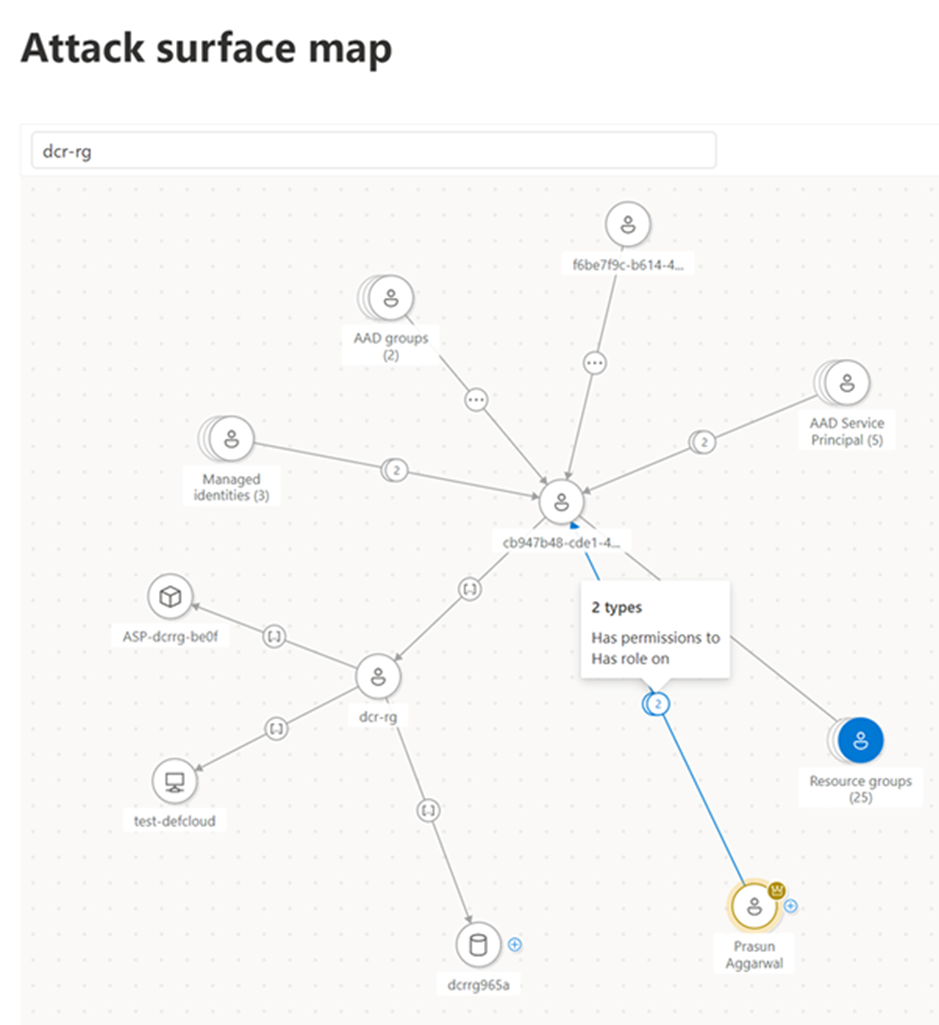
Exposure Management lets you explore the attack surface with an interactive graphic and a strong data query. You can see how assets are connected, how far a threat can spread, and where the next weak points are with the attack surface map. You can also use Graph data in Advanced Hunting tables to access and understand asset exposure better. You can make and run KQL queries that use graph data and other Microsoft Defender data in Advanced Hunting.
Mapping and identifying critical assets
Protecting the vital assets of an organization is essential in the field of attack surface management. These key assets often include the core elements of a business, such as confidential data, proprietary information, and crucial systems. By accurately mapping and locating these critical components, businesses gain a deep insight into their attack surface, allowing strategic defense against possible threats. Concentrating security measures on these high-value assets ensures a focused and effective security approach, reducing the risk of breaches and disruptions. Successfully securing critical assets not only protects sensitive information but also strengthens the overall resilience of the organization, promoting a proactive security posture in a constantly changing threat environment.
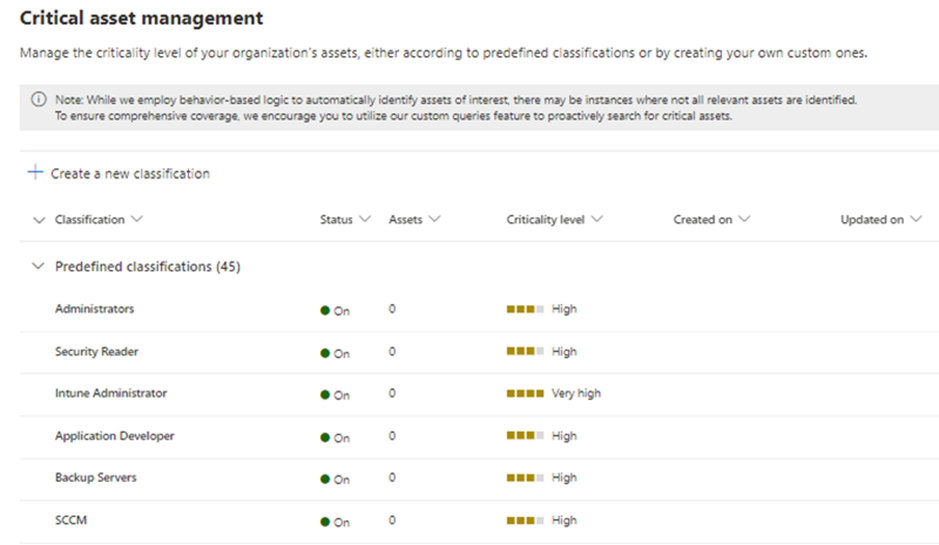
To address this challenge, we are introducing the Critical Asset Management capability. This new capability automatically detects assets that are critical from an attacker's perspective and assigns them an important security context.
Critical Asset Management automatically labels different critical assets in your organization, like DCs (Domain Controllers), ADFS servers, etc. Microsoft plans to improve this feature by adding more types of critical assets. You can also make your own classifications based on criteria for critical assets, using the data from exposure graph.
The criteria for critical assets is useful not just in Exposure Management but also in other Defender products like Defender for Cloud. They use the criticality level of assets to assess risks and give recommendations.
Extending attack path analysis across the entire attack surface
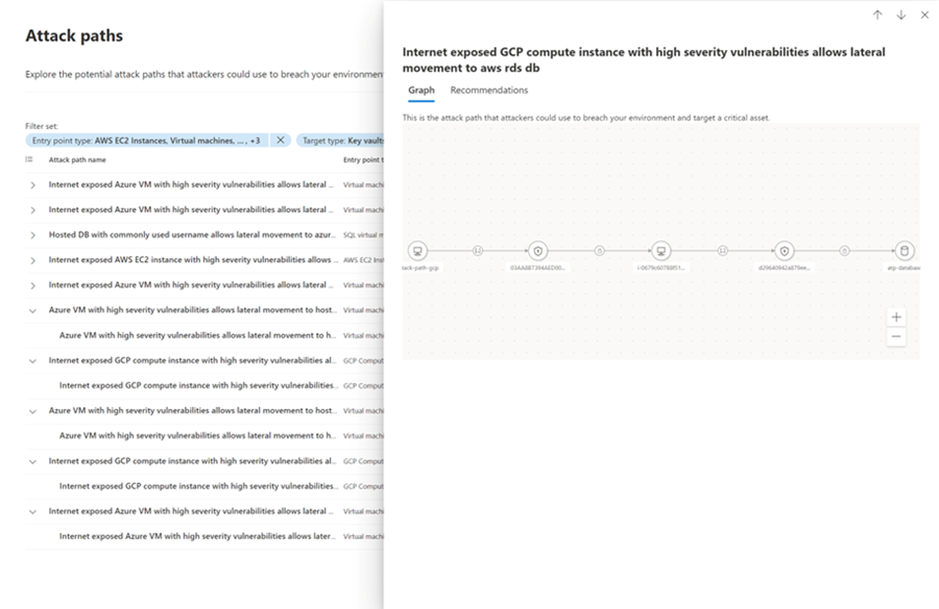
Extended Attack Path Analysis feature helps you protect your critical assets better. This feature shows you how attackers might try to get to your critical assets from possible entry points, such as weak internet-facing devices. It also shows you where they can move sideways in your network. This way, you can see which vulnerabilities and attack vectors need more attention and improve your security accordingly.
Additionally, you can use Advanced Hunting to combine Attack Path data with other data sources. This helps you analyze, understand, and respond to potential security threats more effectively.
With this new feature, you can:
See how attackers could reach your critical assets on-premises or in the cloud, like in a real attack scenario.
Find possible paths that threat actors could use to exploit vulnerabilities.
Enable new use-cases, such as better vulnerability prioritization, directed penetration testing, and improved threat modeling and incident response.
Communicating and optimizing your security posture
Microsoft Security Exposure Management enables organizations to easily turn technical data into business insights and actionable intelligence that can help both business leaders and practitioners. This timely translation of cyber risk answers key cybersecurity questions for stakeholders, such as "How secure are we?", "What are the risks?", "How are we improving over time?", and "What do we need to fix first to lower exposure from a specific threat?" This is done by providing clear metrics to assess, compare, and communicate cyber risk.
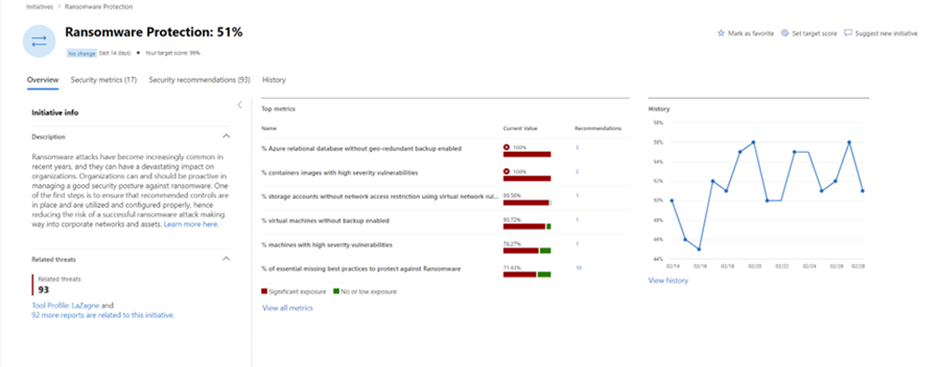
You'll see up-to-date security metrics that our experts carefully selected for each initiative. You'll also find specific security suggestions to help you improve the program's maturity, and insights into security incidents that affect the score. This lets you track the program's progress over time.
As business technology changes constantly, security drift is inevitable. To keep up with new threats, controls need frequent fine-tuning and changes. To help you track changes in security posture, Exposure Management has an event timeline section in the dashboard, and a history tab on each security initiative. This lets you find and fix major exposures that have grown over time, making sure you stay alert and improve your cybersecurity actions.
My Recommendations
As a security professional, I have been using Exposure Management for a few months and I have been impressed by its features and benefits. I would highly recommend it to anyone who is looking for a comprehensive and integrated solution to manage their security exposure. Here are some of the reasons why I think Exposure Management is a great tool:
It provides a single pane of glass for all your assets and exposures, regardless of where they are located or what type they are. You can easily see the status, location, ownership, and details of each asset, as well as the associated vulnerabilities, misconfigurations, and threats. You can also filter, sort, and group your assets and exposures by various criteria, such as severity, category, tag, or initiative.
It helps you prioritize your exposures based on their impact and exploitability, not just their severity. You can see the exposure score of each asset and exposure, which is calculated based on the CVSS score, the threat intelligence, the asset criticality, and the exposure duration. You can also see the exposure trend, which shows how your exposure score has changed over time. This helps you focus on the most urgent and relevant exposures that pose the highest risk to your organization.
It gives you actionable and customized recommendations to remediate and mitigate your exposures, based on your security goals and preferences. You can see the recommended initiatives, which are sets of actions that target specific types of exposures, such as patching, hardening, or isolation. You can also see the expected impact of each initiative on your exposure score, as well as the progress and status of each action. You can also create your own initiatives and actions, or modify the existing ones, to suit your needs and preferences.
It integrates with other Microsoft XDR capabilities and third-party tools for seamless orchestration and automation. You can leverage the power of Microsoft XDR to investigate, respond, and hunt for threats related to your exposures, as well as to enforce policies and controls to prevent future exposures. You can also use the APIs and connectors to integrate Exposure Management with your existing tools and workflows, such as ticketing systems, patch management systems, or configuration management systems.
Exposure Management has helped me gain a better understanding of security exposure, as well as to improve the security posture and reduce the risk. Customers have been able to discover and inventory all their assets, identify and prioritize their exposures, measure and track their exposure score, gain visibility into the threat landscape, get tailored and actionable recommendations, and integrate with other tools and capabilities. Exposure Management has made their security exposure management process more efficient, effective, and easy.
Conclusion
Security exposure management is a critical task for security teams, as it helps you to prioritize your efforts, allocate their resources, and reduce their risk. However, managing security exposure is not an easy task, especially in today's complex and dynamic IT environments. Security teams need a comprehensive and integrated solution that can provide you with a centralized and holistic view of your security exposure, as well as actionable insights and recommendations to improve their security posture.
Exposure Management is a new feature of Microsoft XDR, the cloud-native, cross-domain, and unified security platform that combines the capabilities of Microsoft Defender for Endpoint, Microsoft Defender for Identity, Microsoft Defender for Office 365, Microsoft Cloud App Security, and Azure Defender. Exposure Management is a security exposure management tool that offers key insights, metrics, and customized initiatives for a centralized overview of your risk landscape. It helps security teams to discover and inventory all their assets, identify and prioritize the most critical and exploitable vulnerabilities and misconfigurations, measure and track their exposure score, gain visibility into the threat landscape and the potential impact of exposures, get tailored and actionable recommendations to remediate and mitigate exposures, and integrate with other Microsoft XDR capabilities and third-party tools for seamless orchestration and automation.
I have been using Exposure Management for a few months and I have been impressed by its features and benefits. I would highly recommend it to anyone who is looking for a comprehensive and integrated solution to manage their security exposure. Exposure Management has helped me gain a better understanding of my security exposure, as well as to improve my security posture and reduce my risk.